
.svg)
Bovada

Bovada is a licensed U.S. sportsbook since 2011, offering live betting, crypto payments, and secure access across most states.
Bovada Bookmaker - October 2026
Bovada is an online sportsbook operating since 2011, serving mainly U.S.-based customers. The platform holds a dual license from the Union of the Comoros and the Central Reserve Authority of Western Sahara. Bettors have access to crypto payments, a full live betting section, and a generous welcome bonus. While the site lacks live video streams, it offers graphic match updates and full mobile functionality.
Bovada bookmaker bonus

Payment options
- Visa20 - 1500 $
- MasterCard20 - 1500 $
- Direct Bank Transfer50 - 450 $
- BTC10 - 5000 $
- MatchPay10 - 2000 $
- Player transfer10 - 15000 $
- Voucher—
- Check by Courier—
- Bank Wire—
- BCH10 - 5.000 $
- BSV10 - 5.000 $
- LTC10 - 5.000 $
- ETH50 - 5.000 $
- USDT5 - 5.000 $
Bookmaker information
- LicenseUnion of the Comoros and the Central Reserve Authority of Western Sahara
- Оfficial community
- Year of origin2011
- Live chat
Bookmaker review Bovada
What Is Bovada
Bovada is a leading online gambling platform tailored for U.S. players. It offers a well-rounded experience, with its sportsbook standing as the crown jewel. Whether you're here to place a wager on tonight’s game or spin the reels, this platform covers a lot of ground. Bovada online betting is designed to feel intuitive, fast, and flexible—perfect for anyone from casual punters to sharp bettors.
Bovada License and Regulation
Bovada operates under a license issued by the Union of the Comoros, supervised by the Central Reserve Authority of Western Sahara. Though it doesn't hold a U.S. state license, the Bovada sports betting platform continues to serve American users under offshore regulations. It’s one of the longest-standing platforms in this category, and that consistency speaks volumes to many players.
Main Products
Bovada online is an all-in-one online gambling venue! Sports, live betting, esports, casino slots, real-time play with live dealers – it's all here, under one roof.
Sports
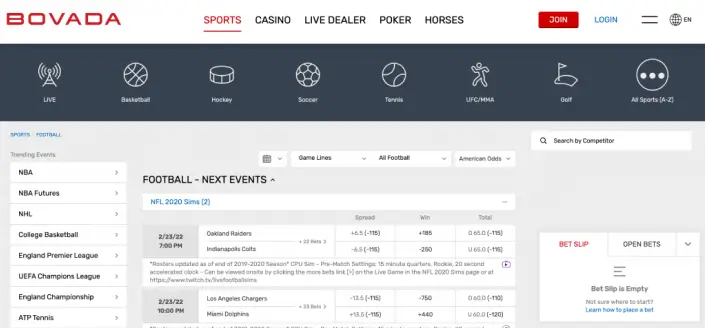
When it comes to sports Bovada, there’s no shortage of action. You’ll find betting lines on the NFL, NBA, MLB, NHL, and top global soccer leagues. What makes Bovada sports betting stand out? It’s the sheer market variety—props, futures, live bets, alternate spreads—you name it.
NFL odds are especially hot, with deep markets on weekly matchups and full futures on the Super Bowl. For hoops fans, Bovada sports covers the NBA and college basketball with the same level of depth. MLB betting, NHL puck lines, and soccer markets from EPL to MLS are all here too.
Looking for a niche? Wager on tennis, golf, MMA, esports, and even politics. And with Bovada live betting, you’re never too late to jump in. Odds update in real-time, so you can gamble while the game unfolds.
Poker
Bovada’s poker room is one of the best for U.S. players, with Texas Hold’em and Omaha tables around the clock. Soft fields and anonymous tables make it beginner-friendly.
Casino
Spin slots, hit blackjack, or try your luck at roulette—the Bovada online casino has all the fan favorites.
Horses
The sports betting Bovada product is not limited to sporting events solely. Their racebook is also prominent! It covers major U.S. and international tracks. Straight bets and exotics are available daily.
Live Dealer
If you miss the buzz of a real casino, Bovada’s live dealer games—blackjack, baccarat, roulette—offer a lifelike fix.
Bovada Promotions
The company is very resourceful regarding the available incentives and freebies.Bovada Promotions come packed with value, giving both sports fans and casino players plenty to get excited about.
New users can grab the $750 welcome bonus with promo code BTCSWB750, a 75% match up to $750 on crypto deposits (5x rollover on sports, 5x on horse, 30x in the casino, valid for 180 days, min deposit $20).
Beyond that, regulars enjoy reload bonuses, loyalty perks, and referral rewards, while special promos run across poker, casino, and, of course, the always-popular Bovada online sports betting offers.
Bovada Payments
Depositing and cashing out at the Bovada sports bet platform is surprisingly hassle-free. Traditional payment systems like credit cards (VISA, MasterCard, American Express) are supported, but what separates Bovada from others is its crypto-friendliness.
You can deposit and withdraw using Bitcoin, Ethereum, Litecoin, and many more. Transactions are fast, secure, and usually come with better limits.
Online Bovada also enables deposits and payouts via vouchers. These are essentially gift codes that you can buy or sell through the Bovada Community. A handy option if you want to stay off the banking grid!
Transaction fees vary by banking method. While credit card deposits may incur a fee, the Bovada betting site does not charge for cryptocurrency deposits. However, remember that cryptocurrency exchanges and/or wallets typically apply their own small transaction charges.
Bovada Odds
Bovada odds are known for being pretty competitive, especially on big U.S. sports like football, basketball, and baseball. You’ll usually find standard lines and fair pricing, with the occasional extra value on niche markets or props. While it may not always beat the sharp bookmakers, Bovada keeps things player-friendly and easy to read. It's a good pick for casual bettors who want reliable odds without overthinking the numbers.
Bovada Customer Help
Got questions? The Bovada Help Center is stocked with FAQs and guides that actually help. Topics include everything from how to place a Bovada sports bet to understanding odds and tracking withdrawals. If you’re stuck, live chat is available 24/7. While email support is slower, it’s still an option. Their knowledge base is particularly strong for individuals new to the online Bovada platform.
Bovada Reviews
Bovada sports betting reviews are predominantly positive, especially among U.S. customers who praise its vast market selection and sleek interface. Fast crypto payouts, a strong live betting capability, and beneficial odds across major disciplines also earn a lot of accolades.
While some individuals mention the site design feels a bit dated or lines can be slower to drop than competitors, the overall consensus is a reliable and enjoyable experience for all bettors.
- Live-Stream
- Available currenciesUSD, BTC, BCH, BSV, LTC, ETH, USDT
- Minimum betting limits$0.50
- Maximum betting limitsDepends on the sport or event
Advantages and disadvantages Bovada
- Generous welcome bonus
- Live match tracking via graphics
- Wide range of supported cryptocurrencies
- Fast registration and no KYC for crypto
- Strong 24/7 customer support
- Convenient deposit and withdrawal methods
- A small deposit minimum with crypto
- No cashback or loyalty program
- Available only for U.S. users (with restrictions by state)
Be the first!
Editor's Rating
Bookmaker bonuses and promotions Bovada
Bovada
Mobile Apps Review
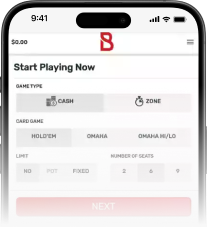
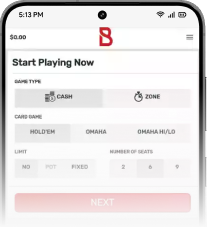
Bovada does not offer a dedicated mobile application for iOS or Android. However, the platform provides a fully functional mobile version of its website, optimized for smartphones and tablets. Users can register, make deposits, place bets, and claim bonuses directly through their mobile browser. While there are no live video streams, the mobile site supports real-time match graphics and provides access to 24/7 customer support. Security is ensured through HTTPS encryption, making mobile usage safe and convenient.
FAQ
Visit the official Bovada site and click the "Join" button. Follow the prompts to create your account and verify your email address.
Use the promo code BTCSWB750 during your first deposit. You’ll get a 75% match bonus up to $750. Be sure to meet the rollover requirements within 180 days.
No, Bovada does not have an official app for iOS or Android. Instead, users can access the fully functional mobile version of the site through their phone’s browser. It supports betting, deposits, and claiming bonuses just like the desktop version.


